
技术分享 | orchestrator–运维–配置集群自动切换&测试
【转载声明】本文为转载文章,原作者「姚嵩」,版权归原作者所有。 原文链接:https://mp.weixin.qq.com/s/xyW_dmMBMEmKp9rqkKs78w
作者:姚嵩
地球人,爱好音乐,动漫,电影,游戏,人文,美食,旅游,还有其他。虽然都很菜,但毕竟是爱好。
本文来源:原创投稿
*爱可生开源社区出品,原创内容未经授权不得随意使用,转载请联系小编并注明来源。
参数说明:
https://github.com/openark/orchestrator/blob/master/go/config/config.go
⽬的:
⽤ orchestrator 配置 MySQL 集群的⾃动切换。
已接管的数据库实例(1主1从架构):
10.186.65.5:3307
10.186.65.11:3307
orchestrator 的相关参数:
"RecoveryIgnoreHostnameFilters": [],
"RecoverMasterClusterFilters": ["*"],
"RecoverIntermediateMasterClusterFilters":["*"],
"ReplicationLagQuery": "show slave status"
"ApplyMySQLPromotionAfterMasterFailover": true,
"FailMasterPromotionOnLagMinutes": 1,
部分测试场景(因为orch是⾼可⽤架构,所以以下实验命令都是在raft-leader节点上执⾏)
案例1:
场景:
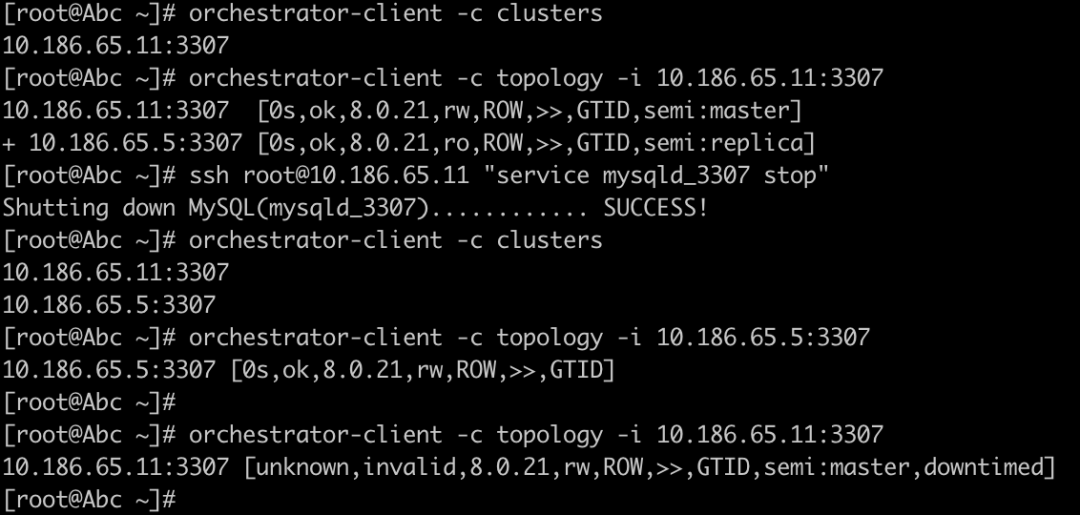
关闭 master,确认是否会切换(延迟 < FailMasterPromotionOnLagMinutes)
操作:
# 确认已有的集群
orchestrator-client -c clusters
# 查看集群拓扑,集群为 10.186.65.11:3307
orchestrator-client -c topology -i 10.186.65.11:3307
# 关闭master节点
ssh root@10.186.65.11 “service mysqld_3307 stop”
# 再次确认已有的集群,原集群会拆分为2个集群
orchestrator-client -c clusters
# 查看集群拓扑,此时集群为 10.186.65.5:3307
orchestrator-client -c topology -i 10.186.65.5:3307
结论:
-
切换成功;
-
新的 master 节点 read_only 和 super_read_only 都关闭了,可以读写;
实验截图:
案例2
场景:
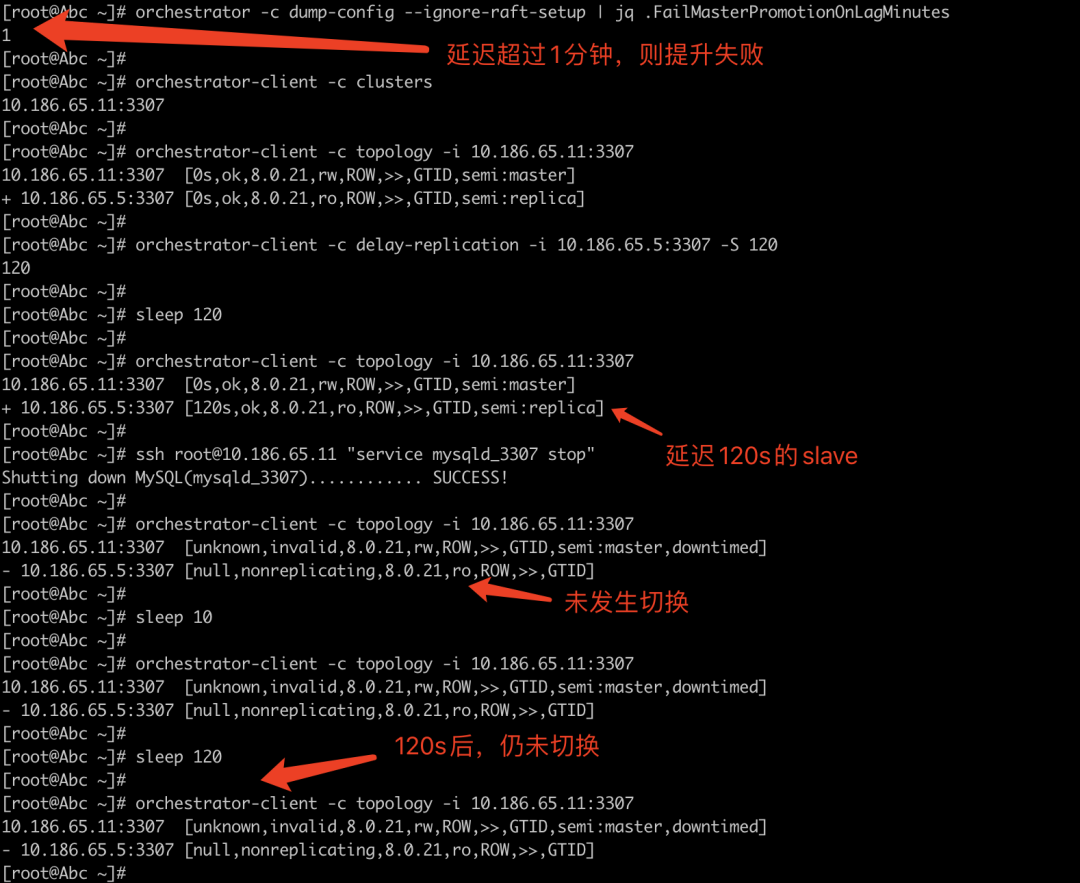
关闭 master ,确认是否会切换(延迟 > FailMasterPromotionOnLagMinutes)
FailMasterPromotionOnLagMinutes 配置的是1分钟,也就是60s
操作:
# 查看运⾏态的FailMasterPromotionOnLagMinutes参数值
orchestrator -c dump-config –ignore-raft-setup | jq .FailMasterPromotionOnLagMinutes
# 确认已有的集群
orchestrator-client -c clusters
# 查看集群拓扑,集群为 10.186.65.11:3307
orchestrator-client -c topology -i 10.186.65.11:3307
# 创建延迟slave(假设此时Slave为10.186.65.5:3307)
stop slave ;
change master to master_delay=120;
start slave ;
或者
orchestrator-client -c delay-replication -i 10.186.65.5:3307 -S 120
# 等待120s
sleep 120
# 查看集群拓扑,集群为 10.186.65.11:3307
orchestrator-client -c topology -i 10.186.65.11:3307
# 关闭master节点
ssh root@10.186.65.11 “service mysqld_3307 stop”
# 再次确认已有的集群
orchestrator-client -c clusters
# 查看集群拓扑,此时集群仍然为 10.186.65.11:3307
orchestrator-client -c topology -i 10.186.65.11:3307
结论:
-
未切换;
-
当备节点延迟⼤于 FailMasterPromotionOnLagMinutes 时,不会发⽣切换。
实验截图:
案例3:
场景:
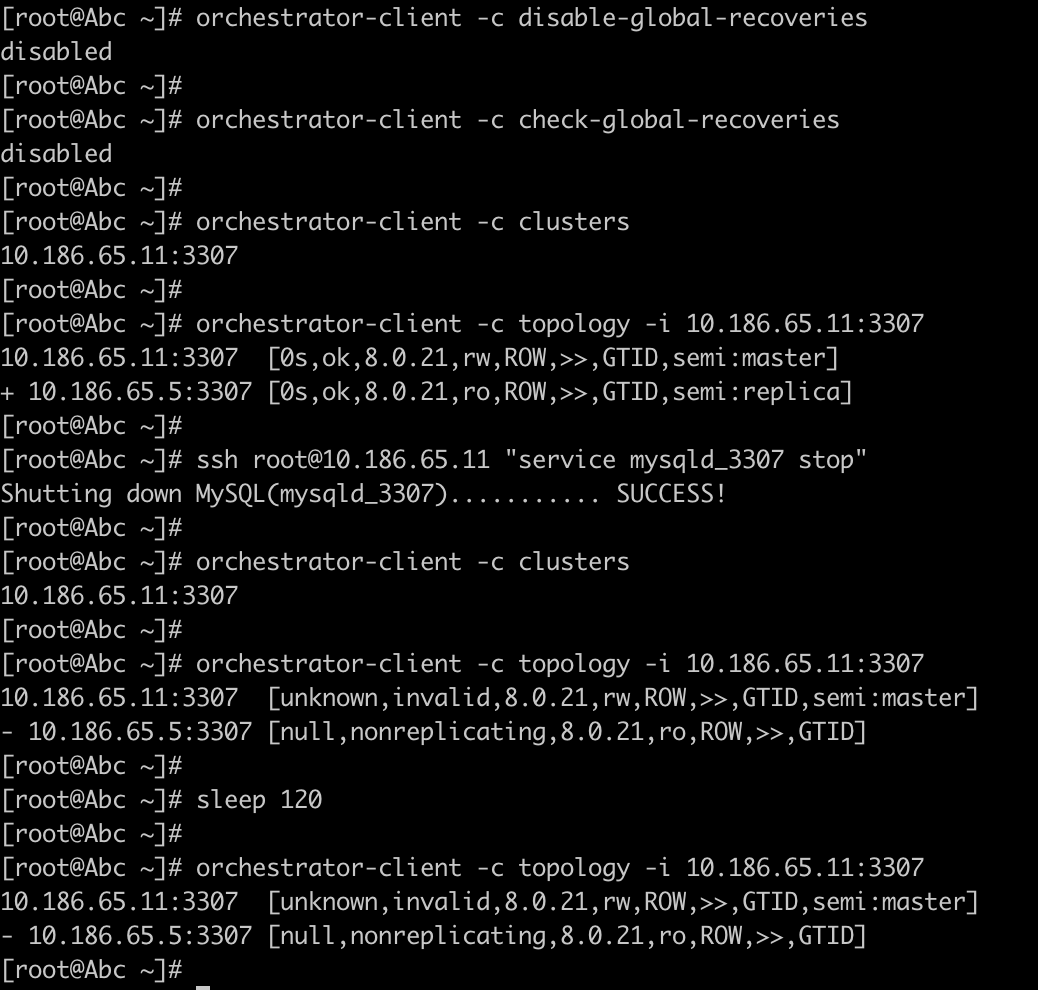
禁⽤全局恢复的情况下,关闭master(延迟 < FailMasterPromotionOnLagMinutes)
操作:
# 关闭全局恢复
orchestrator-client -c disable-global-recoveries
orchestrator-client -c check-global-recoveries
# 确认已有的集群
orchestrator-client -c clusters
# 查看集群拓扑,集群为 10.186.65.11:3307
orchestrator-client -c topology -i 10.186.65.11:3307
# 关闭master节点
ssh root@10.186.65.11 “service mysqld_3307 stop”
# 再次确认已有的集群
orchestrator-client -c clusters
# 查看集群拓扑
orchestrator-client -c topology -i 10.186.65.11:3307
结论:
-
未切换;
-
当关闭了全局恢复时,不会进⾏切换。
实验截图:
总结:
配置了 orchestrator 后,可以配置⾃动切换的 cluster 范围,参数包含不限于:
RecoveryIgnoreHostnameFilters
RecoverMasterClusterFilters
RecoverIntermediateMasterClusterFilters
可以配置收否切换的条件,参数包含不限于:
FailMasterPromotionOnLagMinutes
ReplicationLagQuery
当延迟超过 FailMasterPromotionOnLagMinutes 分钟时,切换失败,当禁⽤了全局恢复时,不会进⾏⾃动切换。
声明:
测试场景很多,但测试时间有限,如有具体场景需求,再具体测试。
如测试结果有出⼊,欢迎探讨。
另可能存在各种因素阻⽌切换,不在此⽂章讨论范围内。
相关文章:
技术分享 | orchetrator–安装一个高可用 orchestrator

社区近期动态

本文关键字:#高可用# #orch# #orchestrator#

点一下“阅读原文”了解更多资讯