最简单的web服务器实现(一)(r4笔记第68天)
公众号:杨建荣的学习笔记 · 作者:r4笔记第68天 · 发布:2015-03-08 23:41:46 · 原文链接
tomcat作为web服务器,想必大家做过web开发的都离不开tomcat了,值得庆幸的是tomcat也是开放源代码的,最近准备好好琢磨琢磨tomcat的源码,还没开始就已经感觉到不少的未知恐惧了,慢慢来把。
可能我的学习方式比较急功近利,但是这种方式收效也快,自己记得在<<Java程序员 上班那点事儿>>里作者写过一个最简单的web服务器实现,自己在网上也比较了一下其它的版本,还是感觉那本书里的版本比较好,在此分享出来,因为时间紧,照着书敲了一遍代码,竟然发现里面有一些很细小的错误,自己准备在这个基础上好好改进一把。
首先来看看web服务器的一些基本原理,我们的实验是基于socket的,开放了一个指定的端口,然后会启用对应的线程来处理浏览器中的请求。如果文件不存在,会报出404错误,否则会解析文件的内容。
HttpServer类是后台服务类,会开放对应的端口和socket来处理浏览发出的请求。
HttpThread类是接受浏览器发送请求的类,通过Receive和Answer来接受和处理浏览器发送的请求,然后返回到客户端中。
package new_test;
-
import java.io.IOException;
import java.net.ServerSocket;
import java.net.Socket;
public class HttpServer {
public static String ROOT=”./wwwroot”;
public static String defaultPage=”index.html”;public static void main(String[] args) throws IOException{
ServerSocket ss = new ServerSocket(8080);
while(true){
Socket s=ss.accept();
System.out.println(“Accept Connection…:”);
new HttpThread(s).start();
}
}
} -
package new_test;
import java.io.IOException;
import java.io.InputStream;
import java.io.OutputStream;
import
} java.net.Socket;public class HttpThread extends Thread {
private Socket socket;
public HttpThread(Socket s) {
this.socket = s;public void run() {
InputStream ins = null;
OutputStream ous = null;
try {
ous = socket.getOutputStream();
ins = socket.getInputStream();
Receive rcv = new Receive(ins);
String sURL = rcv.parse();
System.out.println(“sURL is ” + sURL);if (sURL.equals(“/”)) {
sURL = HttpServer.defaultPage;
}
Answer ans = new Answer(ous);
ans.send(sURL);
} catch (IOException e) {
e.printStackTrace();
} finally {
try {
if (ins != null) {
ins.close();
}
if (ous != null) {
ous.close();
}
if (socket != null) {
socket.close();
}
} catch (IOException e) {
e.printStackTrace();
}
}
}
}
-
package new_test;
import java.io.IOException;
import java.io.InputStream;public class Receive {
InputStream in = null;public Receive(InputStream ins) {
this.in = ins;
}public String parse() {
StringBuffer receiveStr = new StringBuffer(2048);
int i ;
byte[] buffer = new byte[2048];
try {
i = in.read(buffer);
} catch (IOException e) {
i = -1;
}
for (int j = 0; j < i; j++) {
receiveStr.append((char)buffer[j]);}
return getUri(receiveStr.toString());
}private String getUri(String receiveStr) {
int index1, index2;
System.out.println(“receiveStr is ” + receiveStr);
index1 = receiveStr.indexOf(” “);
if (index1 != -1) {
index2 = receiveStr.indexOf(” “, index1 + 1);
if (index2 > index1) {
return receiveStr.substring(index1 + 1, index2);
}
}
return null;
}}
-
package new_test;
import java.io.File;
import java.io.FileInputStream;
import java.io.IOException;
import java.io.OutputStream;public class Answer {
OutputStream out = null;public Answer(OutputStream ous) {
this.out = ous;
}public void send(String pageFile) {
byte[] bytes = new byte[2048];FileInputStream fis = null;
try {
File file = new File(HttpServer.ROOT, pageFile);
if (file.exists()) {fis = new FileInputStream(file);
int ch = fis.read(bytes, 0, 2048);
String sBody = new String(bytes, 0);
String sendMessage = “HTTP/1.1 200 OK\r\n”
+ “Content-Type:text/html\r\n” + “Content-Length:” + ch
+ “\r\n” + “\r\n” + sBody;
out.write(sendMessage.getBytes());
} else {
String errorMessage = “Http/1.1 404 File NOT FOUND\r\n”
+ “Content-Type:text/html\r\n”
+ “Content-Length:23\r\n” + “\r\n”
+ “<h1>File Not Found</h1>”;
out.write(errorMessage.getBytes());
}
} catch (IOException e) {
e.printStackTrace();
} finally {
if (fis != null) {
try {
fis.close();
} catch (IOException e) {
e.printStackTrace();
}
}
}}
}
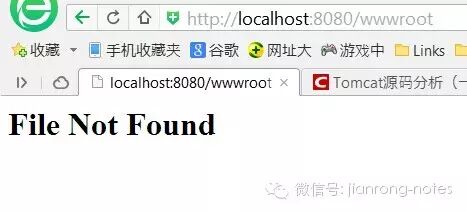
一个简单调用的情况就是,如果不存在对应的页面会直接抛出File Not Found的错误信息