
MySQL优化案例(二)
公众号:杨建荣的学习笔记 · 作者:杨建荣 · 发布:2019-05-14 23:16:12 · 原文链接
这是学习笔记的第 1979 篇文章
近期收到慢日志监控报警,在慢日志平台查看,主要瓶颈在于几条创建临时表的SQL语句,占用了大量的临时空间,需要优化。
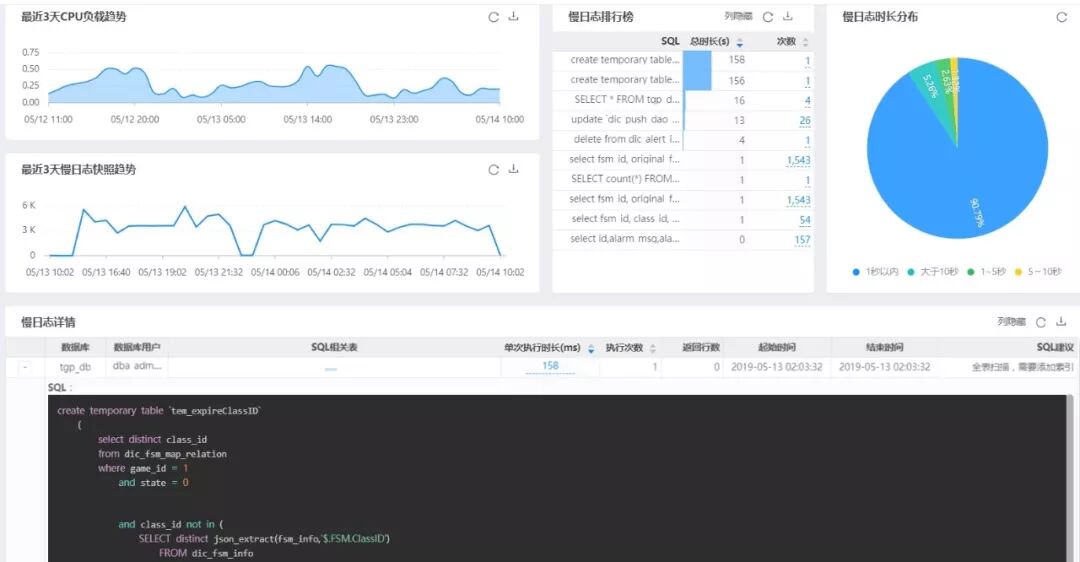
SQL语句为:
create temporary table `tem_expireClassID`
(
select distinct class_id
from dic_fsm_map_relation
where game_id = 1
and state = 0
and class_id not in (
SELECT distinct json_extract(fsm_info,’$.FSM.ClassID’)
FROM dic_fsm_info
where state = 0
and json_extract(fsm_info,’$.FSM.ETime’) > unix_timestamp(now())
)
order by class_id;
两个表的数据量都在几千条,其实不算多,但是执行时间却差很多。
执行时间为150秒左右。
执行计划为:
+—-+——————–+———————-+————+——+—————+——+———+——+——+———-+——————————+
| id | select_type | table | partitions | type | possible_keys | key | key_len | ref | rows | filtered | Extra |
+—-+——————–+———————-+————+——+—————+——+———+——+——+———-+——————————+
| 1 | PRIMARY | dic_fsm_map_relation | NULL | ALL | plat_id | NULL | NULL | NULL | 2403 | 1.00 | Using where; Using temporary |
| 2 | DEPENDENT SUBQUERY | dic_fsm_info | NULL | ALL | NULL | NULL | NULL | NULL | 1316 | 10.00 | Using where |
+—-+——————–+———————-+————+——+—————+——+———+——+——+———-+——————————+
2 rows in set, 1 warning (0.00 sec)
系统层优化:
系统临时表空间占用150G左右
[root@hb30-dba-mysql-tgp-124-34 data]# ll
total 157854040
-rw-r—– 1 mysql mysql 362 Apr 26 2018 ib_buffer_pool
-rw-r—– 1 mysql mysql 2818572288 May 13 14:41 ibdata1
-rw-r—– 1 mysql mysql 158792155136 May 13 14:40 ibtmp1
drwxr-x— 2 mysql mysql 4096 Apr 18 2018 infra
drwxr-x— 2 mysql mysql 4096 Apr 18 2018 mysql
经过系统优化和业务协调需要做MySQL实例重启,已重置为初始大小,设置阈值为10G。
SQL层优化
SQL语句的优化分析发现,基于json类型的解析差异和字符类型存在较大的性能差异,建议对json的子查询创建临时表。
测试步骤如下:
create table dic_fsm_info3 (classid varchar(30),etime varchar(30)); –可以根据业务特点创建索引
mysql> insert into dic_fsm_info3 select distinct json_extract(fsm_info,’$.FSM.ClassID’) ,json_extract(fsm_info,’$.FSM.ETime’) from tgp_db.dic_fsm_info where state=0;
Query OK, 334 rows affected (0.12 sec)
Records: 334 Duplicates: 0 Warnings: 0
重新执行语句,执行时长优化只0.2秒左右。
select distinct class_id from tgp_db.dic_fsm_map_relation
where game_id = 1
and state = 0
and class_id not in (
SELECT distinct classid
FROM dic_fsm_info3
where etime > unix_timestamp(now())
)
| 2704 |
| 2705 |
| 2707 |
| 2715 |
+———-+
73 rows in set (0.23 sec)
JSON类型的解析效率可以通过profile的对比方式来分析:
mysql> show profile cpu for query 1;
+——————–+———-+———-+————+
| Status | Duration | CPU_user | CPU_system |
+——————–+———-+———-+————+
| Sending data | 0.047225 | NULL | NULL |
| executing | 0.000002 | NULL | NULL |
| Sending data | 0.047196 | NULL | NULL |
| executing | 0.000004 | NULL | NULL |
而根据字符类型匹配,效率要高两个数量级。
+——————–+———-+———-+————+
| Status | Duration | CPU_user | CPU_system |
+——————–+———-+———-+————+
| Sending data | 0.000128 | NULL | NULL |
| executing | 0.000001 | NULL | NULL |
| Sending data | 0.000126 | NULL | NULL |
| executing | 0.000001 | NULL | NULL |
后续对JSON类型的使用也需要注意以下。